TikTok trend · 15 s

Dame Hombro AI

Upload your photo and dance the trend. Solo or with a partner.

Your Dame Hombro video

Your photo

Front-facing, good light, one person · full body or waist up works best.

15 s · vertical · about 5 min · Sign in to use credits. Buy credits ·

Your photo goes in. You dance Dame Hombro.

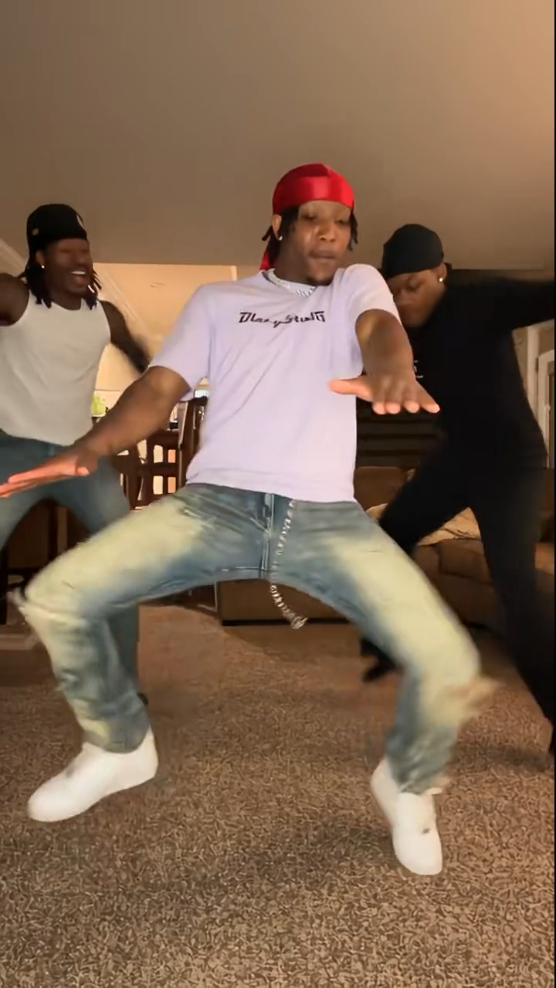
Dame Hombro AI turns a photo into the viral TikTok shoulder dance: bounce, shake, flex, heart hands, lean-in — move for move.

Upload one photo for Solo, or two for With a partner. The AI keeps the sample’s camera and room and puts your face, hair, and outfit into the fixed Dame Hombro routine.

Output is a vertical 9:16 MP4 about 15 seconds long. Add the original Dame Hombro sound in TikTok or CapCut the way everyone in the trend does.

Jump to the upload tool

Solo or with a partner

Solo: one photo replaces the single dancer in the living-room sample — bounce, shoulder shake, arm flex, heart hands, lean toward the camera.

With a partner: two photos, side by side. Photo 1 is left; photo 2 is right. Each person keeps their own face and outfit. Only use photos of people who agreed.

Three steps. Zero editing.

  1. 1

    Upload your photo

    One clear photo for Solo, or two for With a partner (left and right). Front-facing, good light, full body or waist up.

    Jump to the upload tool

  2. 2

    Tap Generate

    Confirm permission and run. Credits are shown on the button. Generation usually takes a few minutes.

  3. 3

    Add the sound

    Download the MP4, then add the original Dame Hombro audio in TikTok or CapCut and post.

Tips for a good result

Front-facing, good light, one person per photo. Full body or waist up so the AI copies your outfit.

Avoid sunglasses, masks, hair over the face, and dark or backlit shots. A photo someone else took often works better than a stretched-arm selfie.

Dame Hombro AI FAQ

Solo or partner, credits, photos — before you generate.

How do I do the Dame Hombro trend with AI?
Pick Solo or With a partner, upload a photo of each person, confirm permission, and tap Generate. In a few minutes you get a 15-second vertical MP4 of the Dame Hombro dance. Open it in TikTok or CapCut and add the original Dame Hombro sound.
Is Dame Hombro AI free?
Videos use credits (500 credits for a 15s clip on the default Solo template). Watching the sample needs no account. Sign in to generate.
Can I make it with my partner or a friend?
Yes — choose With a partner and upload two photos. Photo 1 dances on the left; photo 2 on the right. Only use photos of people who agreed. No celebrities or minors.
Will I be wearing my own clothes?
Yes. Face, hair, skin tone, and outfit come from your photo; the dance, camera, and room come from the sample. For a different look, upload a photo in that outfit.
What format is the video?
Vertical 9:16 MP4, about 15 seconds, no Vocalove watermark. Sound depends on the template; most people still add the original Dame Hombro track in TikTok for the trend.
What kind of photo works best?
Front-facing, good light, one person per photo — full body or waist up. Avoid sunglasses, covered faces, and dark or backlit shots. A photo someone else took often works better than a stretched-arm selfie.
What does Dame Hombro mean?
Word by word it roughly means “give me your shoulder.” It’s a line from a dembow song by Dominican artist Bulin 47. TikTok settled on a fixed routine: bounce, shake the shoulders, flex an arm, heart hands, then lean into the camera.
Is this affiliated with Bulin 47?
No. Dame Hombro AI is an independent fan-style tool for the TikTok dance trend. It is not affiliated with Bulin 47 or his label. Videos come without the original song — add that sound yourself on TikTok.

Consent-first dance clips

Only animate people who agreed. No celebrities or minors.

  • Permission first

    Only upload faces and likenesses you own or have explicit permission to animate.

  • Delete when you want

    Remove generated videos from your account; contact us to delete your account and associated content.

  • Not for training ads

    Uploads are used to generate your clip — not sold for ads or unrelated model training.

  • Credits for exports

    Preview the template free. Credits apply when you generate and download your video.